Find the photographs worth showcasing.
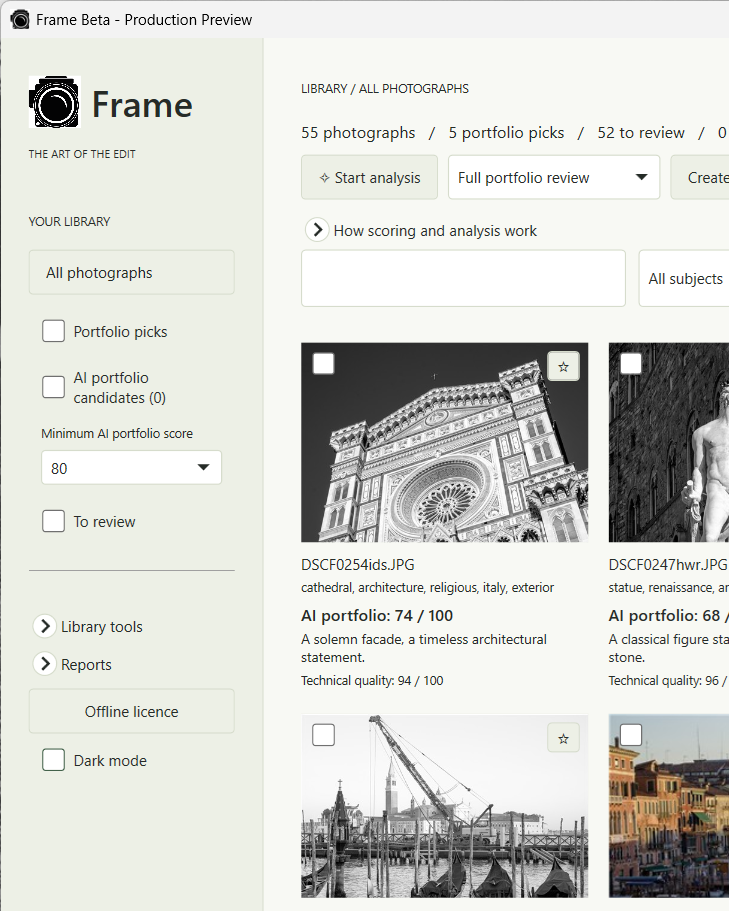
Frame is a Windows desktop app that helps you organise your photographs, generate subject tags and captions, and review AI suggestions for your portfolio. It supports black and white, colour, film and digital photography.
Choose your favourites, create a web gallery, or export full-resolution copies with caption-based filenames and embedded tags. Your original photographs remain unchanged.
Getting started
Run the installer and follow Frame’s setup screen to download the AI engine and models. Initial setup requires internet access and several GB of free storage. No separate Ollama installation is needed.
To enable analysis, send your computer’s request code and order or beta reference to the publisher. Import the licence file you receive. The licence is permanent for that computer, with no subscription or recurring activation checks.
To receive your licence, email your request code and order number to cr.chrisrigby@gmail.com. Your licence file will be sent back by email.
Invitation-only beta
This is an unsigned test release for invited Windows users. AI assessments are suggestions for your review, not an objective measure of photographic quality. Please report installation problems, errors and unexpected results.
Find the photographs worth showcasing.
Frame is a Windows desktop app that helps you organise your photographs, generate subject tags and captions, and review AI suggestions for your portfolio. It supports black and white, colour, film and digital photography.
Choose your favourites, create a web gallery, or export full-resolution copies with caption-based filenames and embedded tags. Your original photographs remain unchanged.
Getting started
Run the installer and follow Frame’s setup screen to download the AI engine and models. Initial setup requires internet access and several GB of free storage. No separate Ollama installation is needed.
To enable analysis, send your computer’s request code and order or beta reference to the publisher. Import the licence file you receive. The licence is permanent for that computer, with no subscription or recurring activation checks.
To receive your licence, email your request code and order number to cr.chrisrigby@gmail.com. Your licence file will be sent back by email.
Invitation-only beta
This is an unsigned test release for invited Windows users. AI assessments are suggestions for your review, not an objective measure of photographic quality. Please report installation problems, errors and unexpected results.